更多>>PHP程序设计 Blog
来源:一度好 时间:2020-02-08 阅读:9252
一些小伙伴在使用 ThinkPHP6 分页的时候,发现分页样式不够美观。还有就是使用分页后,搜索条件会丢失,本文将一一为你解决这些问题。
首先说一下前提条件是多应用模式下,假设每页显示 3 条记录。
控制器文件所在路径:
/app/index/controller/DemoController.php
模板视图文件所在路径:
/app/index/view/demo/index.html
一、先来看默认情况下,ThinkPHP6 自带的分页样式
1、控制器 DemoController.php 代码如下:
<?php
namespace app\index\controller;

use app\BaseController;

use think\facade\Db;
use think\facade\View;

class DemoController extends BaseController
{

	// 列表
	// http://localhost/index.php/index/Demo/index.html
    public function index()
    {
		//
		// 列表数据 开始
		//
		$news_title = input('param.news_title');

		$where = " is_show='Y' ";
		if($news_title != '')
		{
			$where .= " and news_title like '%".$news_title."%' ";
		}

		// 完整分页
		$list = Db::name('news')->field('news_id, news_title')->where($where)->order('news_id desc')->paginate(3);

		// 简洁分页
		//$list = Db::name('news')->field('news_id, news_title')->where($where)->order('news_id desc')->paginate(3, true);

		$pages = $list->render();  //分页
		$list = $list->toArray();  //数据集

		View::assign('list', $list);
		View::assign('pages', $pages);
		//
		// 列表数据 结束
		//

		return View::fetch();
    }

}
2、模板视图文件 index.html 代码如下:
<!DOCTYPE HTML>
<html>
<head>
<meta http-equiv="Content-Type" content="text/html; charset=utf-8" />
<meta http-equiv="X-UA-Compatible" content="IE=edge">
<meta name="viewport" content="width=device-width, initial-scale=1">
<title>DEMO</title>
<style>
* { font-size:14px;}
table { border:1px solid #DDD; border-collapse:collapse;}
table td { border:1px solid #DDD; border-collapse:collapse; padding:5px;}
</style>
</head>

<body>

<table>
<tr>
<td>ID</td>
<td>标题</td>
</tr>
{volist name="list.data" id="vo"}
<tr>
<td>{$vo.news_id}</td>
<td>{$vo.news_title}</td>
</tr>
{/volist}
</table>
<div>{$pages|raw}</div>

</body>
</html>
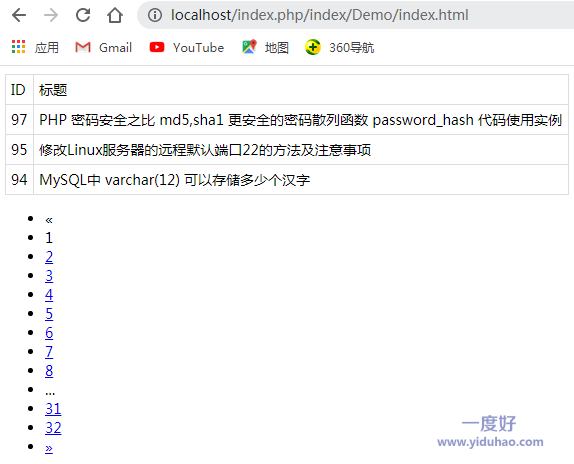
3、完整分页的样式
如图所示:
4、简洁分页的样式
如图所示:

5、尝试分页的情况下,网址中带搜索条件
http://localhost/index.php/index/Demo/index.html?news_title=php
此时,点击下一页,会发现,搜索条件 news_title=php 丢失了
二、下面就来解决这些问题
1、先来解决默认分页样式中的 《 》 上一页,下一页的小箭头的问题
(1)把 Bootstrap 分页类复制过来
ThinkPHP 中的 Bootstrap 分页类的位置:
/vendor/topthink/think-orm/src/paginator/driver/Bootstrap.php
把这个分页类放到如下的位置:
首先在 /app/ 目录下,新建 common 文件夹
/app/common/Bootstrap.php
(2)打开这个分页类文件
第 27 行 把 « 修改为 上一页
即:
protected function getPreviousButton(string $text = "«"): string
修改为:
protected function getPreviousButton(string $text = "上一页"): string
第 46 行 把 » 修改为 下一页
即:
protected function getNextButton(string $text = '»'): string
修改为:
protected function getNextButton(string $text = '下一页'): string
(3)修改配置参数
文件位置:/app/provider.php
新增如下代码:
// 自定义分页类
//'think\Paginator' => 'app\common\Bootstrap'
即:
<?php
use app\ExceptionHandle;
use app\Request;

// 容器Provider定义文件
return [
    'think\Request'          => Request::class,
    'think\exception\Handle' => ExceptionHandle::class,
	// 自定义分页类
	'think\Paginator'      =>    'app\common\Bootstrap'
];
2、完整分页时,对分页样式的优化
在模板视图文件中添加如下 CSS 代码:
/* 前台 完整分页 分页效果 - bootstrap 样式 start */
.pagination {
  display: inline-block;
  padding-left: 0;
  margin: 20px 0;
  border-radius: 4px;
}
.pagination > li {
  display: inline;
}
.pagination > li > a,
.pagination > li > span {
  position: relative;
  float: left;
  padding: 6px 12px;
  margin-left: -1px;
  line-height: 1.42857143;
  color: #337ab7;
  text-decoration: none;
  background-color: #fff;
  border: 1px solid #ddd;
}
.pagination > li:first-child > a,
.pagination > li:first-child > span {
  margin-left: 0;
  border-top-left-radius: 4px;
  border-bottom-left-radius: 4px;
}
.pagination > li:last-child > a,
.pagination > li:last-child > span {
  border-top-right-radius: 4px;
  border-bottom-right-radius: 4px;
}
.pagination > li > a:hover,
.pagination > li > span:hover,
.pagination > li > a:focus,
.pagination > li > span:focus {
  z-index: 2;
  color: #23527c;
  background-color: #eee;
  border-color: #ddd;
}
.pagination > .active > a,
.pagination > .active > span,
.pagination > .active > a:hover,
.pagination > .active > span:hover,
.pagination > .active > a:focus,
.pagination > .active > span:focus {
  z-index: 3;
  color: #fff;
  cursor: default;
  background-color: #337ab7;
  border-color: #337ab7;
}
.pagination > .disabled > span,
.pagination > .disabled > span:hover,
.pagination > .disabled > span:focus,
.pagination > .disabled > a,
.pagination > .disabled > a:hover,
.pagination > .disabled > a:focus {
  color: #777;
  cursor: not-allowed;
  background-color: #fff;
  border-color: #ddd;
}
.pagination-lg > li > a,
.pagination-lg > li > span {
  padding: 10px 16px;
  font-size: 18px;
  line-height: 1.3333333;
}
.pagination-lg > li:first-child > a,
.pagination-lg > li:first-child > span {
  border-top-left-radius: 6px;
  border-bottom-left-radius: 6px;
}
.pagination-lg > li:last-child > a,
.pagination-lg > li:last-child > span {
  border-top-right-radius: 6px;
  border-bottom-right-radius: 6px;
}
.pagination-sm > li > a,
.pagination-sm > li > span {
  padding: 5px 10px;
  font-size: 12px;
  line-height: 1.5;
}
.pagination-sm > li:first-child > a,
.pagination-sm > li:first-child > span {
  border-top-left-radius: 3px;
  border-bottom-left-radius: 3px;
}
.pagination-sm > li:last-child > a,
.pagination-sm > li:last-child > span {
  border-top-right-radius: 3px;
  border-bottom-right-radius: 3px;
}
/* 前台 完整分页 分页效果 - bootstrap 样式 end */
分页效果,如图所示:

3、简洁分页时,对分页样式的优化
在模板视图文件中添加如下 CSS 代码:
/* WAP 简洁分页 分页效果 - bootstrap 样式 start */
ul.pager li { margin-left:10px; margin-right:10px;}
.pager {
  padding-left: 0;
  margin: 20px 0;
  text-align: left;
  list-style: none;
}
.pager li {
  display: inline;
}
.pager li > a,
.pager li > span {
  display: inline-block;
  padding: 5px 14px;
  background-color: #fff;
  border: 1px solid #ddd;
  border-radius: 15px;
}
.pager li > a:hover,
.pager li > a:focus {
  text-decoration: none;
  background-color: #eee;
}
.pager .next > a,
.pager .next > span {
  float: right;
}
.pager .previous > a,
.pager .previous > span {
  float: left;
}
.pager .disabled > a,
.pager .disabled > a:hover,
.pager .disabled > a:focus,
.pager .disabled > span {
  color: #777;
  cursor: not-allowed;
  background-color: #fff;
}
/* WAP 简洁分页 分页效果 - bootstrap 样式 end */
分页效果,如图所示:

4、分页时,搜索条件丢失的解决方法
只需要把 paginate 方法,稍作如下调整,即可完美解决
(1)完整分页时
将 paginate 方法,由
// 完整分页
$list = Db::name('news')->field('news_id, news_title')->where($where)->order('news_id desc')->paginate(3);
修改为:
// 完整分页
$list = Db::name('news')->field('news_id, news_title')->where($where)->order('news_id desc')->paginate(['list_rows'=>3, 'query'=>request()->param()], false);
(2)简洁分页时
将 paginate 方法,由
// 简洁分页
$list = Db::name('news')->field('news_id, news_title')->where($where)->order('news_id desc')->paginate(3, true);
修改为:
// 简洁分页
$list = Db::name('news')->field('news_id, news_title')->where($where)->order('news_id desc')->paginate(['list_rows'=>3, 'query'=>request()->param()], true);
经过测试,在 ThinkPHP6 的分页中遇到的分页样式不美观,尤其是搜索条件丢失的问题,得到完美解决。
评论列表 |
|
暂时没有相关记录
|
发表评论